
Recognise the relationship
See matched caller and linked student information, then open the relevant MIS profile. Caller matching helps the conversation start smoothly; it is not identity verification.
Let office teams recognise more callers and reach the right record sooner. EdTechPro connects 3CX with school management systems including Arbor and Bromcom, helping conversations with parents and carers begin with useful context instead of another search.
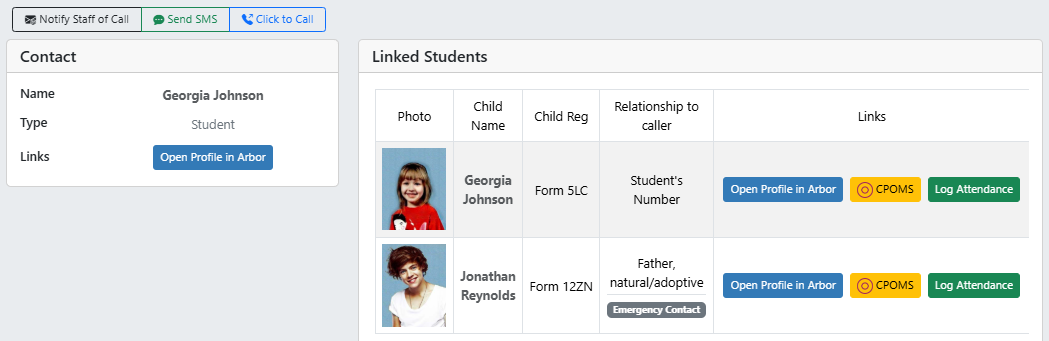
A parent calls about a child, and the person picking up already knows which child, and how the two are related.
EdTechPro Portal brings the matched caller and pupil information together when office staff answer, helping them begin with the right family context.
See matched caller and linked student information, then open the relevant MIS profile. Caller matching helps the conversation start smoothly; it is not identity verification.
See the call history and notes so a different colleague can follow up with context. Journaling into Arbor communications and notes keeps the call connected to the school record.
Reach the relevant profile without starting a manual name search. Notify a colleague about the call with key details already available.
Screen pop-ups can highlight court-order relationships and pinned notes. The optional CPOMS integration adds information for authorised safeguarding teams.
Bring multiple schools and MIS connections into a shared phone-system environment while retaining the access each school needs. Infinitel supports the telephony and school-office experience together.
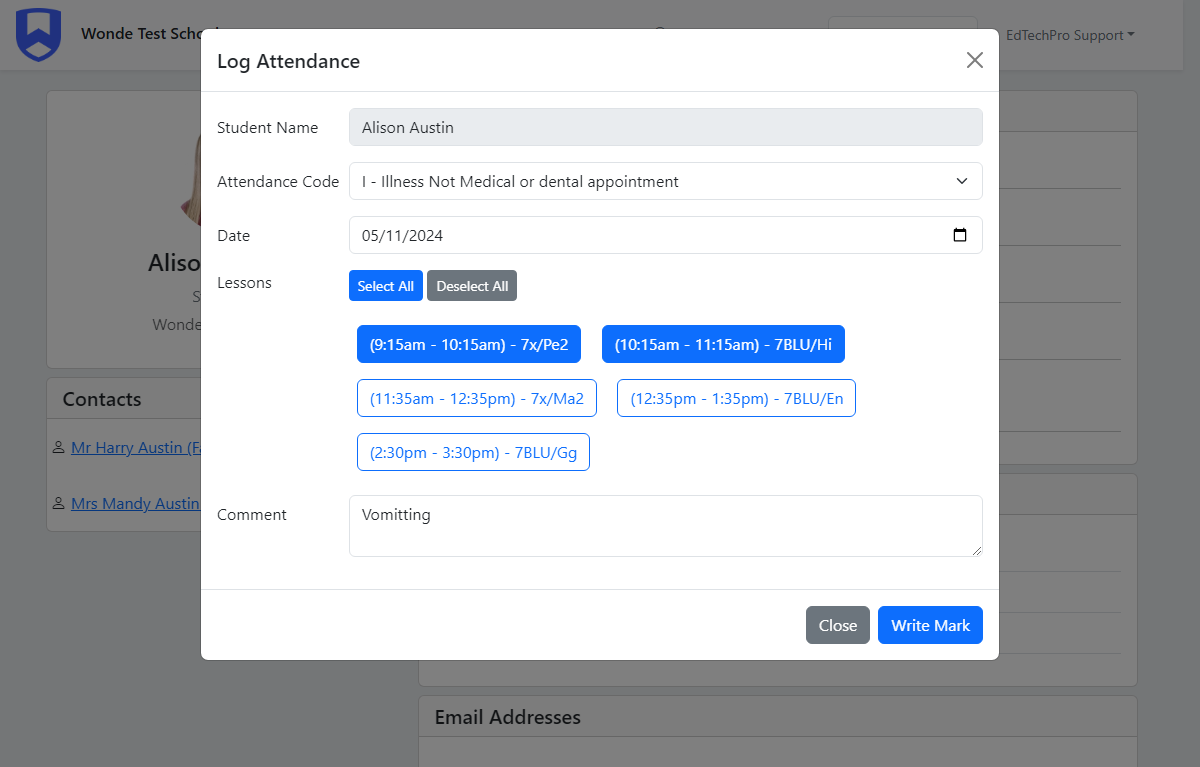
Portal Pro adds session and lesson attendance writeback, helping the office move from a parent’s call to the attendance record without another separate search. Available fields depend on the MIS connector.
Record the relevant session or lesson while the parent’s information is in front of you. Writeback reduces repeated entry between the call and the attendance task.
EdTechPro also offers AI-assisted absence voicemail handling that suggests an absence code. Staff review the message and proposed code before relying on it; availability and any additional cost depend on the chosen service.
Infinitel supplies the EdTechPro connection alongside Managed 3CX and helps the school put it into everyday use.
| Capability | Portal Lite | Portal Pro |
|---|---|---|
| Caller identification and screen pop | Caller and MIS information on answer | Included |
| History, journaling and staff notification | Available core Portal workflows | Included |
| Attendance writeback | Use the school’s existing MIS workflow | Session and lesson logging through the MIS connector |
| School-specific integrations | MIS connection and core call context; available fields vary by connector. | Additional attendance workflows; connector and optional-module charges can apply. |
Infinitel brings EdTechPro and Managed 3CX together so school staff have one specialist provider behind the phone system and its MIS connection. Get help using the tools across reception, attendance and follow-up.
Your school sets access, safeguarding and data-protection responsibilities. Tell us the systems and workflows in the initial enquiry, without including pupil records or sensitive family details.
No. Infinitel can deploy EdTechPro on the 3CX system your school already runs, whoever manages it. Schools that would rather have the phone system and the MIS integration from one provider can also move 3CX to Infinitel.
It can support trusts using compatible 3CX and MIS environments. The configuration follows each school’s data access, telephony and operational responsibilities.
EdTechPro lists Arbor, Bromcom, ESS SIMS, iSAMS and ScholarPack. Available fields, attendance writeback and additional modules differ by connector. Your proposal identifies the functions and licence costs for your school’s MIS.
Yes. Share your MIS name and the work you want to improve, such as caller recognition or attendance follow-up. The demonstration uses example information; please do not include pupil records or sensitive family details in an enquiry.
See a caller matched to the right family, a colleague pick up the context and an attendance task completed in Portal. Book a demonstration for your school or trust’s MIS.