
Consistent capture for designated users
An organisational recording policy captures the designated communications while staff continue using Teams. Recording becomes part of the service instead of relying on someone to press a button.
Find the call behind a customer query and give supervisors evidence for useful coaching. CallCabinet adds searchable recording to Microsoft Teams, with Infinitel supporting the recording and voice service.
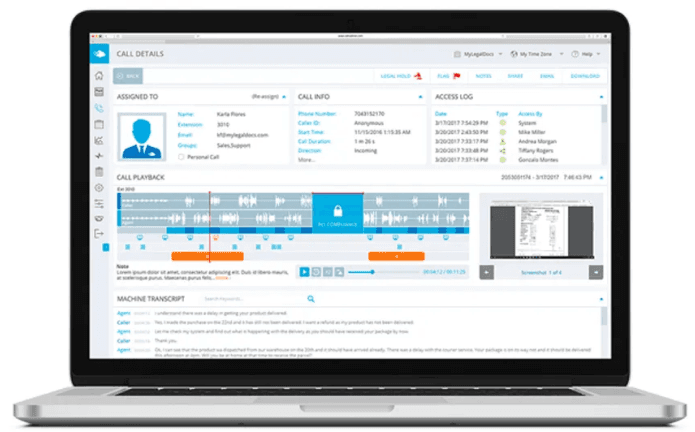
An organisational recording policy captures the designated communications while staff continue using Teams. Recording becomes part of the service instead of relying on someone to press a button.
Use call details to locate an interaction, then replay it with the context an authorised reviewer needs to resolve a query.
Bring recordings, access history and retention controls into a dedicated service for customer resolution and quality programmes.
CallCabinet gives authorised reviewers a focused place to find and use recordings. Start with the interaction, establish what happened and share only what the next person needs.
Review call details alongside playback and available transcription. Notes and evaluation tools can turn a specific conversation into practical coaching.
Limit search, playback, export and sharing to the people who need them. Access history helps trace how recordings are used.
A recording button and an organisational recording policy serve different needs.
| Requirement | Useful approach |
|---|---|
| An occasional meeting recording | Teams’ native recording may meet a straightforward collaboration need, subject to its permissions and storage settings. |
| Consistent capture for designated people or calls | CallCabinet’s policy-based capture, with the required Microsoft licence and recording integration. |
| Retention, access controls and review workflows | A defined recording service with storage, search and authorised review responsibilities. |
| Topics, transcripts and quality evaluation | Select the relevant analytics and quality-assurance capabilities; these are separate from Teams call-volume reporting. |
Find what a customer asked for and what your team said in response. Playback and available transcripts help a reviewer reach the relevant exchange and give the next colleague useful context.
Use an interaction to show a good response or explain where more support would help. Evaluation and analytics options make review more consistent across the team.
Make customer queries easier to resolve and coaching easier to act on, with one Infinitel team behind Teams calling and recording. We set up the selected call capture, help authorised reviewers use it and support the supplied service. Your proposal separates recording, storage and analytics from Teams calling and Microsoft licensing.
It gives authorised teams a searchable record of selected calls for customer queries, quality review and regulated workflows.
Capture the designated Teams conversations automatically through an organisational recording policy. Infinitel plans the users and call journeys with you, including queues and transfers. Coverage, Microsoft licences and behaviour when recording is unavailable are confirmed for the selected service.
Yes. CallCabinet offers transcription, evaluation, redaction and conversation-analytics options. Infinitel can demonstrate the relevant capability and include it where it supports your use case.
Your organisation owns the recording notices, access rules, retention decisions and lawful basis. Storage region, legal hold and redaction options must fit those policies. CallCabinet supplies technical controls; Infinitel supports the service and does not replace your legal or compliance decisions.
See an authorised reviewer find a call, replay the relevant exchange and use it for customer resolution or coaching. Arrange a CallCabinet demonstration for your Teams service.