
Find pressure on your team
Bring call volumes, response patterns and missed demand into view. Decide where additional cover or a different call flow could help customers reach you.
See where calls build up, understand unanswered demand and turn Microsoft Teams activity into better service decisions. Infinitel brings Dimensions dashboards, wallboards and historical reporting to the questions your managers need to answer.
Bring call volumes, response patterns and missed demand into view. Decide where additional cover or a different call flow could help customers reach you.
Compare activity across working periods and departments. Use a pattern of demand to inform rotas and opening hours, instead of reacting to one difficult day.
Give service leaders and department managers a shared view of communications activity, with measures that match their responsibilities.
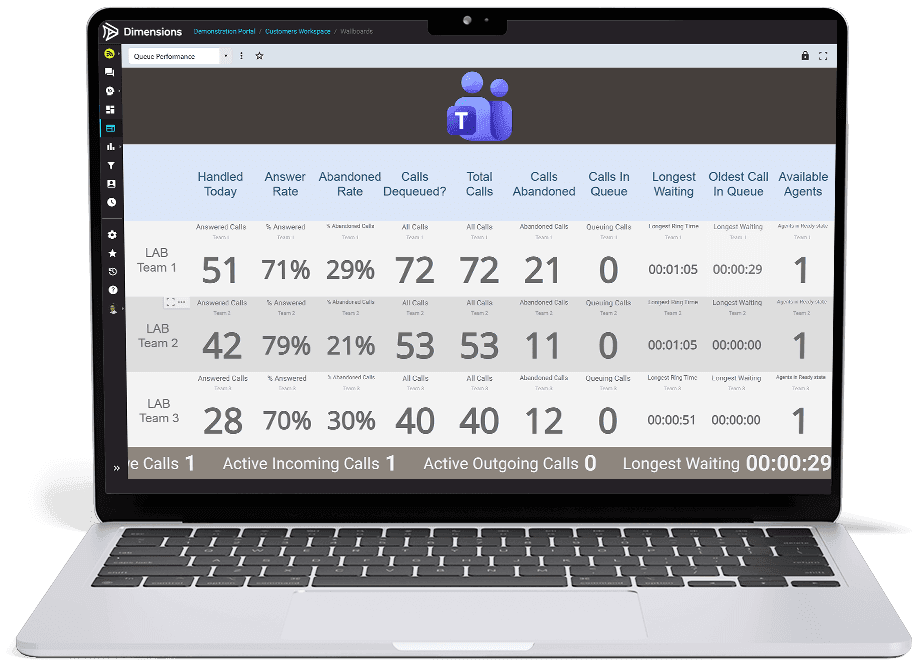
A wallboard puts selected queue measures where supervisors and colleagues can see them. Use it to spot unanswered demand and focus the next action.
See answered and abandoned calls, answer rate and queue measures together. Supervisors can recognise growing pressure and direct attention to the team that needs cover.
A focused wallboard keeps the measures that matter visible during the working day. Department views help colleagues see their own service, without searching a large report.
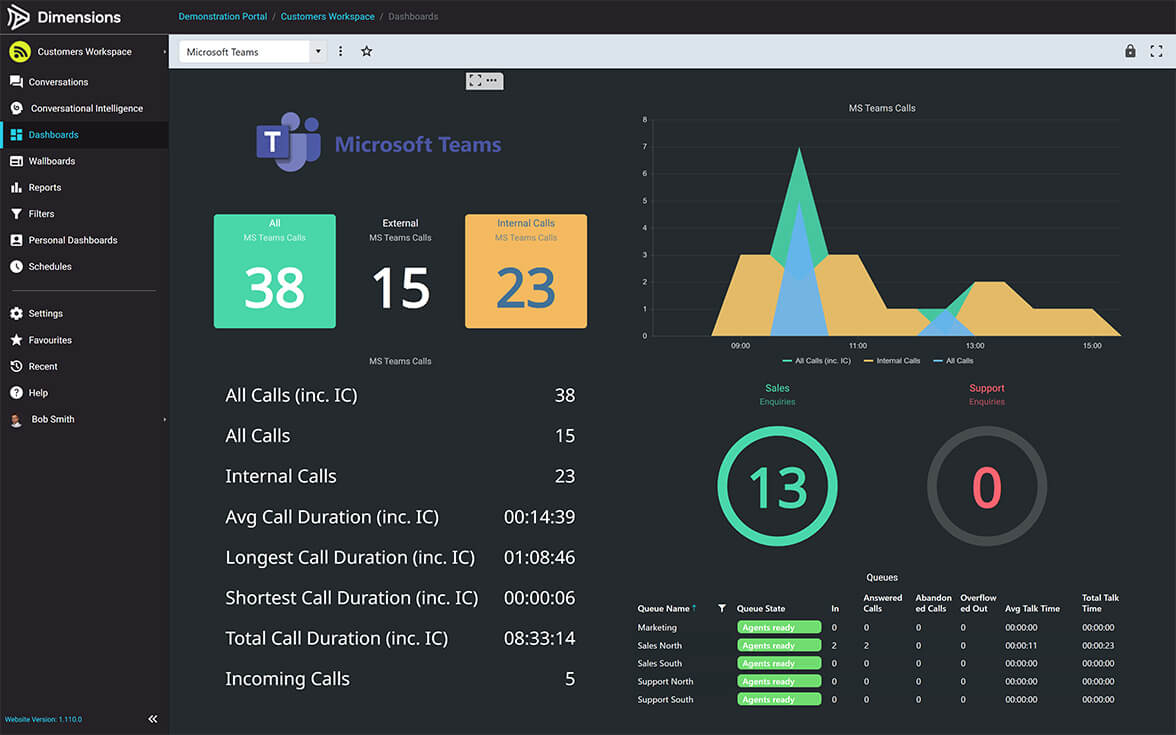
The Teams dashboard brings call totals and an activity timeline together. Historical analytics lets you carry that conversation beyond the current shift.
Look at call activity over the periods that matter to your business. Compare internal and external calling to put customer-facing demand in context.
Compare equivalent periods before and after a change to staffing or routing. A pattern of shorter waits or fewer abandoned calls helps managers judge whether service is improving.
Dimensions supports Teams calling, meeting activity and reporting alongside supported connected telephony platforms.
| The question | The useful view | The decision it supports |
|---|---|---|
| Where are calls going unanswered? | Call activity, response patterns and available queue measures. | Who should investigate, follow up or provide cover. |
| When do we need more capacity? | Historical call trends across agreed periods. | Staffing, hours and routing changes. |
| How is Teams being used? | Calling and meeting-activity reporting. | Adoption support and communication patterns across departments. |
| What happens across our different systems? | Correlated activity from supported connected platforms. | A consistent management view across a hybrid environment. |
Dimensions is an additional reporting service alongside your Teams telephony and Microsoft licences. Choose the connected platforms, reporting access, historical period and views your managers need. Infinitel sets up the agreed data connections and dashboards; reporting licences, implementation and support are identified separately from voice charges.
In a demonstration, explore a busy period, an unanswered-call pattern and the team view behind it. Available measures and refresh times depend on the data Microsoft makes available; not every Teams measure updates instantly.
It uses the Dimensions platform with a Microsoft Teams connection. Available data and reporting depend on the connected system. Native 3CX reporting and Dimensions for 3CX have their own service pages.
Your people continue to call in Teams while authorised managers use Dimensions for dashboards, wallboards and reporting. Dimensions is licensed separately, with access controls for your managers.
Yes. Ask Infinitel for a demonstration using the Teams reporting experiences relevant to your environment, including the measures and historical periods you need.
See where calls are missed, when demand peaks and how team activity changes. Arrange a Dimensions demonstration and get a proposal for the management views your organisation needs.