

A redesigned web client
The web client has been refreshed across the areas people use most: Team, the dialer, Chat, call history, Contacts, voicemail, recordings and settings. The Team view now has comfortable and compact layouts, and the dialer is simpler, with frequently used actions easier to reach.
Smarter AI
- Call prioritisation: the AI Personal Assistant decides in real time whether to notify you, interrupt what you're doing or block the call.
- Emails from calls: AI can draft and send follow-ups, confirmations and summaries during a call. This needs your own email provider set up.
- Better route-by-name: AI agents put callers through to the right colleague more accurately.
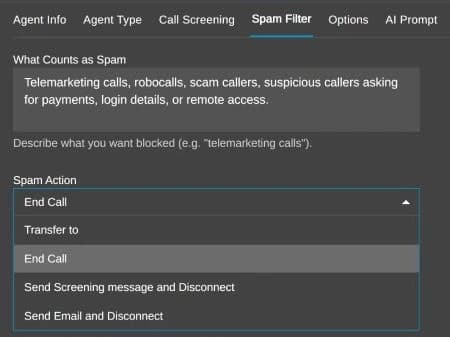
- Built-in spam filtering: unwanted calls are caught before they reach your team.
Better queues for busy teams
- Callback on request: callers press a key to be called back, and keep their place without waiting on hold.
- Escalation over time: calls can widen to more agents or skill groups the longer a caller waits.
- More accurate wait times: estimates are now based on real agent performance.
- More comfort messages: up to 15, with configurable timing.
Also in Update 9
Update 9 adds Grok (xAI) as a lower-cost option for call transcription, summaries and sentiment. It also brings holiday prompts for queues, ring groups and IVRs, and the option to send system and audit logs to your own monitoring tools.
Before you update
- Take a backup and keep it somewhere other than the phone system itself.
- Pick a quiet time. Updates restart services, so avoid your busiest hours.
- Tell your team the web client looks different, so nobody is caught out on Monday morning.
- Decide what to switch on. Callbacks and spam filtering are the quick wins for most businesses.
If Infinitel manages your 3CX system, talk to us about when to move and what to switch on first.
Source: 3CX, “V20 Update 9 Final: Redesigned Web Client & Smarter AI”, 16 June 2026.